
CMMS software that makes maintenance manageable
AssetLab's computerized maintenance management system (CMMS) turns reactive maintenance into predictable operations - work orders that run themselves, full cost visibility, and mobile access for field teams.
Reduce downtime
Avoid setbacks with a proactive, preventive maintenance strategy and move fast when emergencies do happen.
Increase productivity
Prioritize and complete work orders faster with efficient, collaborative software your team will love using.
See every work order
Track open and historical work orders for full compliance and complete visibility into tasks at the individual staff level.
The hidden cost of reactive maintenance
Every unplanned breakdown cascades into lost time, emergency overtime, and expedited parts. A CMMS replaces firefighting with a plan - so small problems get caught before they turn into expensive ones.
Emergency breakdowns cost more
Emergency repairs cost three to five times more than the same work planned ahead - in overtime, expedited parts, and lost production.
Time lost hunting for information
Without a central system of record, technicians waste hours every week searching for asset history, manuals, and past work orders.
Maintenance costs stay invisible
When labour, parts, and vendor spend are not tracked against each asset, much of the true maintenance cost never surfaces at budget time.
Complete work orders faster
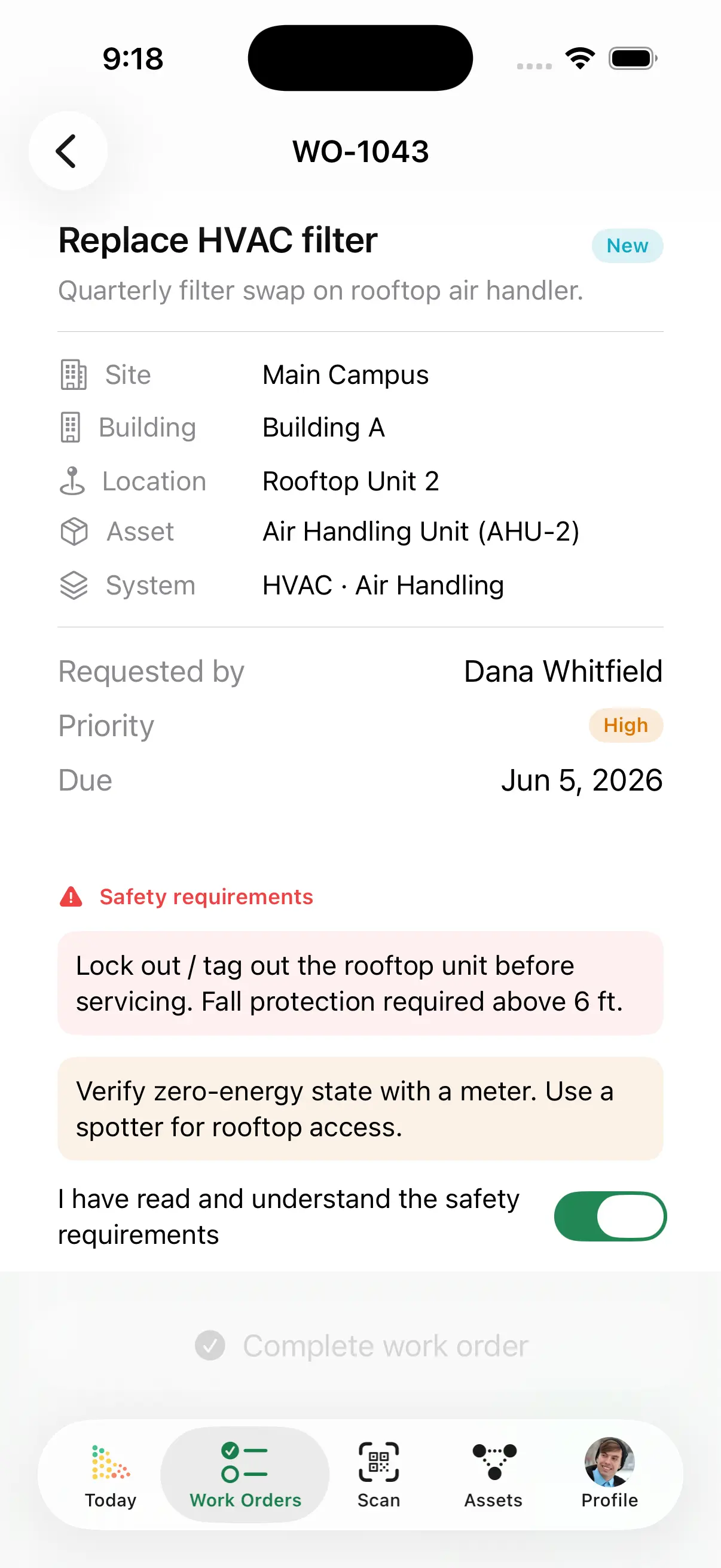
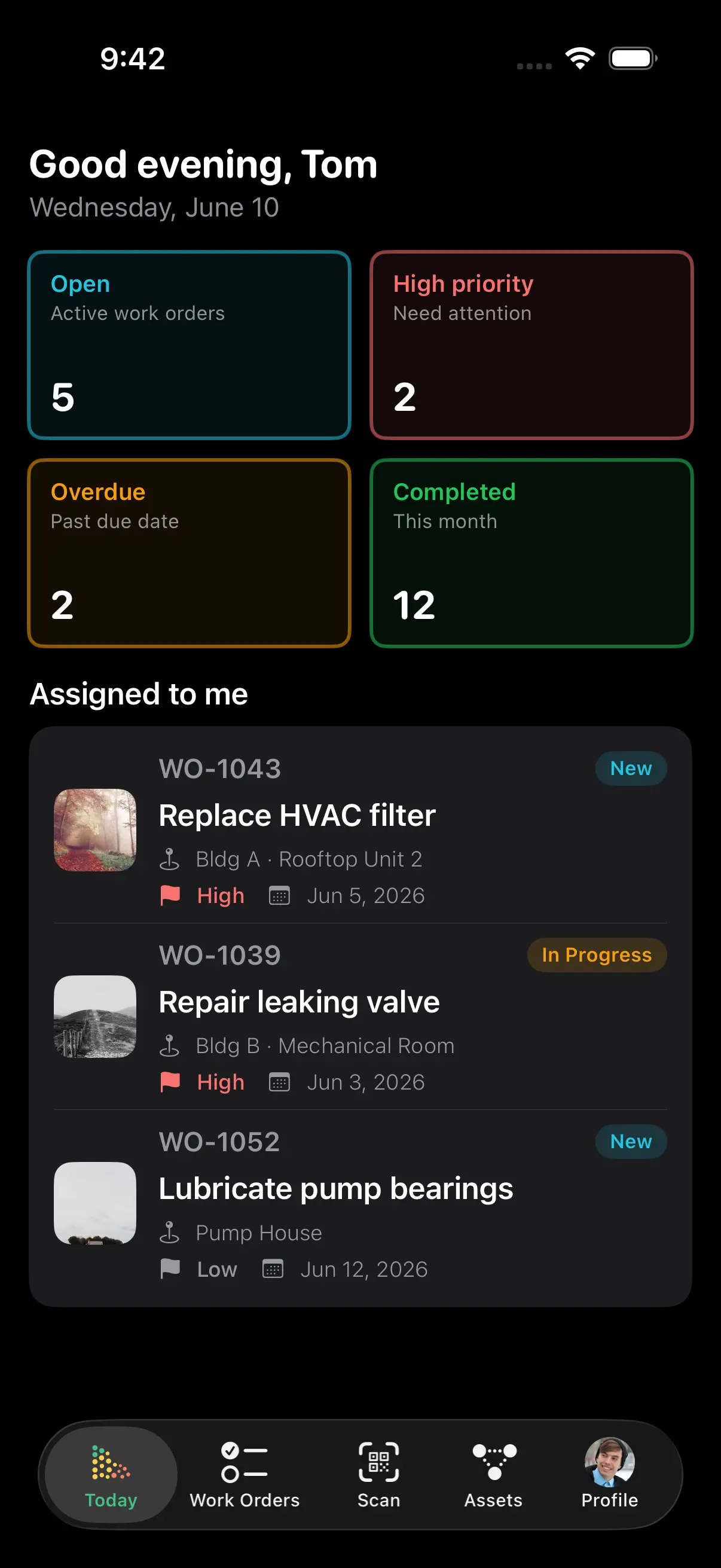
Requests come in, you approve or reject them, work gets assigned, and nothing falls through the cracks. Your team always knows what's next - without chasing tickets or status updates.
- Requests arrive from the portal or a dedicated intake email address - approve or reject them before they become work orders
- Create, assign, and track work in list, Kanban, or calendar views
- Hand a contractor a secure link to one job - they update progress and fill the inspection form without an account
- Auto-assign by skill, location, or workload
- Notifications keep work moving without follow-up emails
- Every completion logged with hours, parts, and costs - audit-ready
Prevent failures before they happen
PM schedules generate work orders automatically, with checklists and procedures pre-filled. Set it once - your team just executes.
- Work orders create themselves when maintenance comes due
- Rolling schedules reset from actual completion - no quarterly PM pileups
- Fixed calendar schedules for compliance-driven inspections, with an inspection form attached so answers come back as data
- Overdue PMs are flagged before they become breakdowns
Rolling schedules prevent PM pileups
Rolling PM calculates the next due date from when the work was actually completed - not a fixed calendar date. That keeps every quarterly or monthly task from landing on the same day and spreads workload evenly across the year.
Fixed schedules for compliance
Fixed PM creates work orders on set calendar dates - ideal for seasonal maintenance, annual inspections, and compliance-driven tasks that have to happen on schedule regardless of when the last one was done.
Everything your team needs, in the field
Every asset gets a QR code automatically. Scan it with any phone and the asset's full record opens - no trips back to the office, no hunting through filing cabinets. Field teams report saving 10+ hours per week.
- Complete work order history and maintenance procedures
- Manuals, diagrams, photos, and parts at your fingertips
- Create or complete work orders on the spot
Know where every dollar goes
Labor, parts, and vendor costs are captured on every work order and roll up into each asset's total cost of ownership - so repair-or-replace decisions are based on data, not gut feel.
- See maintenance spend by asset, building, or site
- Spot money-pit assets before the next budget cycle
- Export audit-ready financial reports for budgeting
Built for the way your industry works
From manufacturing floors to healthcare facilities, schools, and commercial buildings, AssetLab adapts to how your team already runs maintenance.
Manufacturing & production
A production line goes down at 2 AM. The technician scans the QR code on the failed motor, sees it has already failed three times this year, opens a work order, logs the parts used, and schedules a replacement - back online in 45 minutes instead of four hours.
Healthcare facilities
Annual medical-equipment calibration comes due. The PM schedule auto-creates dozens of work orders and pre-assigns them to the biomedical team, each with its calibration checklist, previous results, and vendor contact - full compliance with zero missed inspections.
Commercial property
A tenant reports an HVAC issue through the work-request portal. The system routes it to the right technician by building, who scans the unit, sees the same fault was resolved three months ago, and applies the same fix - a 30-minute resolution.
Education & grounds
A grounds crew runs a rolling PM schedule across 23 lawn areas. Each area is serviced every 14 days from its last completion - no more "everything due on Monday" pileups, and workload stays evenly distributed all season.
And everything else you'd expect
"I really like the integration of PM/repair work with the value of assets, easily allowing me to see which things need to be replaced in the future. The turn around time on support has been so fast, I have no complaints."
Stop Reacting.
Start Preventing.
Join organizations across Canada using AssetLab to eliminate reactive maintenance, reduce costs, and keep operations running smoothly.
No credit card required
Keep Learning About CMMS
What Is CMMS? A Complete Guide
Learn how computerized maintenance management systems work and why organizations adopt them.
CMMS vs EAM: What’s the Difference?
When maintenance management is enough, and when you need full lifecycle asset management.
CMMS Implementation Guide
A step-by-step playbook for rolling out a CMMS - from data import to team adoption.
Mobile CMMS Guide
How field teams use QR codes and mobile access to cut trips back to the office.
Reactive vs Preventive Maintenance
The real cost difference between fighting fires and preventing them - with the data to prove it.
CMMS ROI Calculator
Estimate the savings a CMMS would deliver for your team - downtime, labour, and parts.
CMMS Software FAQ
Common questions about CMMS software, pricing, implementation, and how AssetLab compares.
What is CMMS software?
CMMS stands for computerized maintenance management system - software that centralizes work orders, preventive maintenance schedules, asset records, parts inventory, and maintenance costs in one place. Instead of spreadsheets, paper tickets, and tribal knowledge, a CMMS gives maintenance teams a single system of record for everything they maintain.
How much does CMMS software cost in Canada?
US-based CMMS solutions typically range from $20-100 USD per user per month, with key features gated behind higher tiers. AssetLab offers transparent, published CAD pricing from $45 per user/month - no custom quotes, no per-module licensing, and no currency exchange uncertainty.
How long does CMMS implementation take?
With AssetLab, most teams are live in days, not months. Import your asset registry from spreadsheets, and QR codes are generated automatically for every asset. PM schedules can be set up the same week, and guided onboarding helps your team adopt the system quickly without external consultants.
What is the difference between CMMS and EAM software?
A CMMS focuses on day-to-day maintenance operations: work orders, PM scheduling, and parts. EAM (enterprise asset management) adds full lifecycle management - capital planning, condition assessment, risk scoring, and replacement forecasting. AssetLab combines both: CMMS for daily maintenance plus capital planning, FCI tracking, and asset replacement planning in one platform. Read our full CMMS vs EAM comparison.
Does AssetLab CMMS work on mobile devices?
Yes. The full AssetLab platform works on phones and tablets. Technicians scan a QR code on any asset to instantly open its work order history, procedures, parts, and documents - and can create or complete work orders right from the field. See the mobile CMMS guide for details.
How do maintenance requests get into AssetLab?
Three ways. Staff and tenants use the self-service request portal. Anyone can email a dedicated intake address (like acme-staff-requests@requests.assetlab.ca) - no account, portal, or app needed, and you can create as many addresses as you like, each with its own defaults and rules about who may use it. And contractors work from a secure shared link to a single work order, view-only or with completion allowed. Every path lands in the same queue, with a two-way message thread that follows the request onto the work order. See work order management for details.
Is my maintenance data stored in Canada?
Yes. AssetLab offers Canadian data residency with PIPEDA-aligned privacy practices - your asset and maintenance data stays in Canada, which matters for municipalities, healthcare, education, and other public-sector organizations.