

One system for every department
The operational, strategic and financial layer for your spatial and non-spatial infrastructure.
Arenas and watermains on the same scale
An ice plant, a plow and a 1970s cast-iron main all get a 0-100 condition score, so council can compare them directly instead of reading three reports.
Crews see their own work
The water operator opens the app and sees hydrants and mains. The arena technician sees the ice plant. Nobody scrolls past another department’s backlog to find today’s job.
Finance stops re-keying
When a capital project closes, its cost goes into the tangible capital asset register. Year-end PSAB reporting starts from records that are already there.
Every asset the municipality owns, in one register
Most municipalities keep buildings in one system, roads in another and trees in a spreadsheet. AssetLab scores all of them on the same 0-100 condition scale, so the capital plan and the levels of service report draw from one source.
Non-spatial assets
Everything that lives at a site or in a building, organized site → building → location.
- City hall, arenas, pools, libraries, fire halls
- HVAC, elevators, generators, pumps
- Fleet: plows, graders, transit and service vehicles
- IT and equipment
Spatial assets
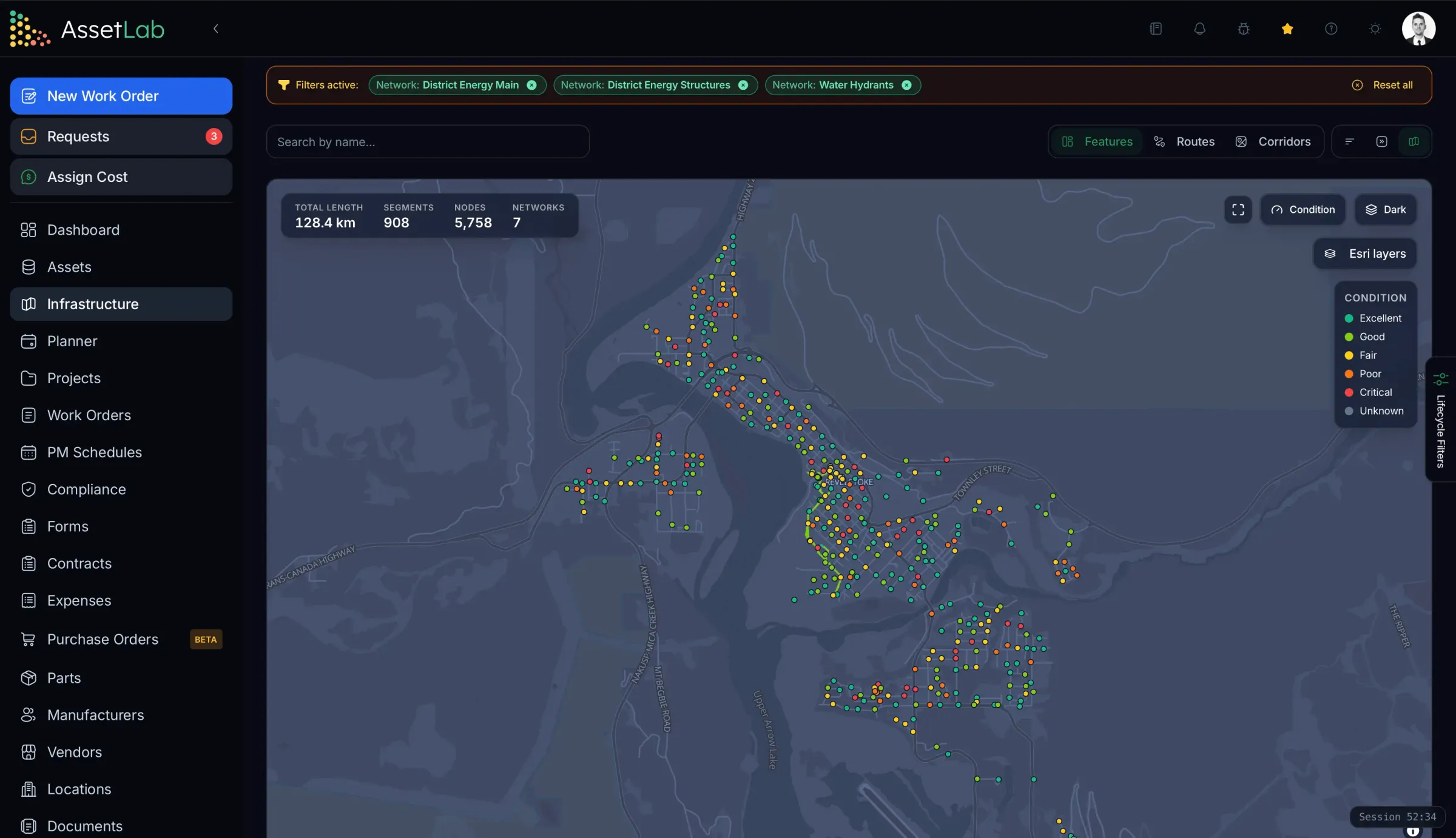
Linear and point infrastructure as networks of features on a map.
- Roads, sidewalks and bridges
- Watermains, valves and hydrants
- Sanitary and storm sewers, manholes
- Streetlights and traffic signals
Natural assets
Set up as their own network beside the pipes and roads they protect.
- Wetlands and creeks
- Urban forest and street trees
- Stormwater ponds and swales
- Parks and natural areas
Structured the way your municipality is
System classes can mirror your departments, and each department keeps its own categories beneath them as system groups. The register reads like your org chart, and every report can be cut by department without a separate system for each one.
- Facilities, Parks, Fleet, IT and any department you add
- Department-specific groups, from arenas to heavy equipment
- Work routed to each department’s crew by category
- Budgets and condition compared across departments
Classifications
- FacilitiesSystem classHVACElectricalLife safetyBuilding envelope
- Parks & RecreationSystem classArenasPoolsPlaygroundsSports fields
- FleetSystem classLight vehiclesHeavy equipmentTransit
- ITSystem classNetworkEnd-user devicesRadio
Everyone sees their part
One instance does not mean everyone sees everything. Three layers decide what each person can do and see, and administrators always see the whole picture.
Role
What can they do?
Four fixed roles - Administrator, Manager, Staff, Requester - each including everything below it. No permission maze to audit.
Workspace
Which side of the app?
Facilities, Infrastructure, or both. A roads crew lead never wades through arena equipment, and menus and reports follow.
User group
What do they see?
Scope a group to sites, networks or system classes. The database enforces it on every screen, map, dashboard and export.
Water operator
Staff · Infrastructure
Group: Water network
- WM-1042 Elm St main38
- HYD-311 Zone 374
- V-208 Gate valve61
Arena technician
Staff · Facilities
Group: Arenas
- Ice plant compressor52
- Zamboni room exhaust81
- Dehumidifier DH-267
Asset manager
Manager · All
Group: No group: sees everything
- Water network avg.63
- Recreation facilities71
- Wetlands network avg.78
Same instance, three people. Groups also drive auto-assignment, request notifications and the features residents can report against.
Capital projects, from plan to register
The capital plan says what to renew. Projects deliver it, against the same assets, so nobody re-keys a watermain into a separate project tool and back again.
- Link each project to the assets it renews - a building, a system or a stretch of watermain
- Phases, tasks with dependencies, milestones and a risk register
- Budget lines tracked as budgeted, committed and actual, with change orders
- Dig-once corridors show where road and pipe renewals line up, so the trench opens once
- When the project closes, its cost is capitalized into the tangible capital asset register
A capital plan that survives the budget hearing
Every forecast draws a baseline where nothing is done and assets age out, plus a Planner line that credits the replacements you have scheduled. The gap between them is the business case, in condition and in dollars.
- 20-year replacement forecast across buildings and networks
- Likelihood x consequence of failure to rank what goes first
- Funding scenarios and council-ready exports
Two apps, built for two kinds of field work
A technician in a mechanical room and a crew on a rural road need different tools. Both native iOS and Android apps work offline and sync when the signal comes back.
AssetLab Work Orders & CMMS
For facility, fleet and equipment technicians
- Work order queue, photos, forms and checklists
- Scan an asset QR code to see its history
- Submit work requests from the floor
- Works offline, syncs when back in range
AssetLab Public Works
For road, water and sewer crews
- Nearby features on a map, coloured by condition
- Work orders sorted nearest-first, worked stop by stop
- Inspections on the network’s own condition scale
- Works offline, syncs when back in range
Included with the Infrastructure module on Enterprise.
Connects to the rest of City Hall
AssetLab does not ask finance, GIS or the service desk to give up their systems. An open API, webhooks and a live GIS link keep the data moving between them.
REST API
A documented API with an interactive reference and keys scoped per resource, read or write. Sync finance and ERP, 311 or CRM, and BI tools.
Webhooks
Push events such as new work orders to the systems that need to react, instead of polling for changes.
Live Esri ArcGIS overlay
Paste a Feature or Map Server URL and bind features by GlobalID. Your GIS stays the source of truth; nothing is migrated.
MCP server for AI assistants
Let Claude, ChatGPT or Copilot query and update records under the same scoped keys as the API.
Single sign-on
Staff sign in with the identity provider the municipality already manages.
Import and export
Bring inventories in from spreadsheets, GeoJSON or Shapefile, and export any list for council packs.
The evidence your asset management plan stands on
AssetLab holds the inventory, condition, levels of service and lifecycle data that plans under O. Reg. 588/17 and other provincial frameworks are built from. The plan itself stays yours to adopt and endorse.
- Asset inventory with replacement values
- Condition assessment on a 0-100 scale
- Current and proposed levels of service
- Lifecycle management strategies
- Risk: likelihood x consequence of failure
- 20-year financial forecast
Ontario
O. Reg. 588/17Asset Management Planning for Municipal Infrastructure
Requires municipalities to adopt a strategic asset management policy and plans covering all infrastructure assets.
- Strategic Asset Management Policy
- July 2019
- AMP for Core Infrastructure
- July 2022
- Complete AMP for All Assets
- July 2024
- Proposed Levels of Service
- July 2025
British Columbia
Asset Management BCProvincial Asset Management Framework
Guidance and support for local governments implementing sustainable asset management practices.
- Asset Management Roadmap
- Ongoing
- Build Communities Strong Fund requirements
- Grant-tied
Alberta
MSI GuidelinesMunicipal Sustainability Initiative
Provincial funding that encourages comprehensive asset management for sustainable service delivery.
- Capital Planning Requirements
- Funding-tied
- Asset Management Implementation
- Ongoing
All Provinces
BCSF Community streamBuild Communities Strong Fund (formerly the Canada Community-Building Fund)
Federal allocation funding that requires asset management commitments. Municipal Funding Agreements from April 1, 2024 to March 31, 2034 remain in force.
- Asset Management Commitment
- Agreement-tied
- Annual Report and asset management questionnaire
- April 30
Built for Enterprise. Municipalities run on the Enterprise plan, which includes the Infrastructure module, Level of Service, project management, the API and SSO, priced to your scope.
Compare plans →Frequently Asked Questions
Common questions about running a municipality's assets, departments and asset management plan in AssetLab.